Not all Active Directory attributes are replicated between domain controllers. While most attributes are synchronized across the domain, some are maintained locally on each domain controller and can contain different values. Common examples include lastLogon, badPwdCount, and whenChanged.
In this article, I'll show you how non-replicated attributes work and how to list all non-replicated attributes in your domain.
What is a non-replicated attribute?
A non-replicated attribute in Active Directory is an attribute whose value is stored and maintained locally on each domain controller rather than synchronized across the domain. This means the same attribute can have different values depending on which domain controller you query.
For example, the lastLogon attribute records the last time a user authenticated against a specific domain controller. Because this attribute is not replicated, each domain controller maintains its own value.
Non-replication example
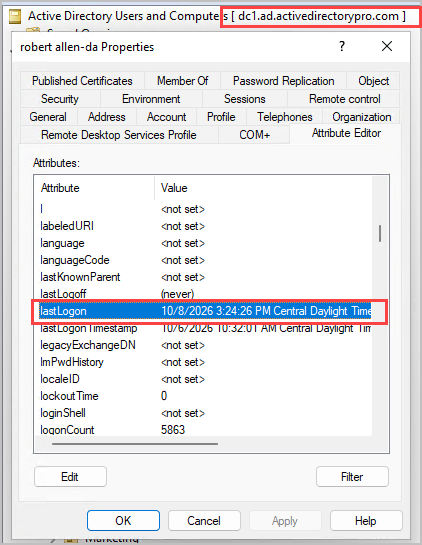
Let's look at an example in Active Directory. I'm connected to domain controller DC1, I open the attribute editor and see the lastLogon value.
Now I'll connect to domain controller DC2, I open the attribute editor and the same account has a different date for lastLogon.
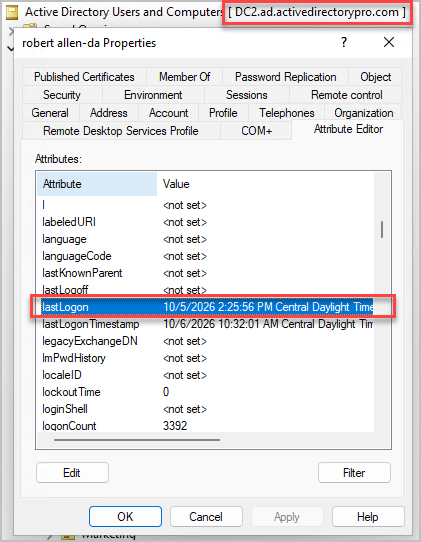
So the attribute has a value of 10/8/2026 on DC1 and a value of 10/5/2026 on DC2.
This is a great example of how an attribute is updated on one domain controller and it's not replicated to other domain controllers, therefore each domain controller has a different value.
Replication example
Now let's look at a replicated attribute so you can see the difference.
Back on my DC1, I'll look at the attribute lastLogonTimestamp this attribute is replicated so each domain controller should be the same.
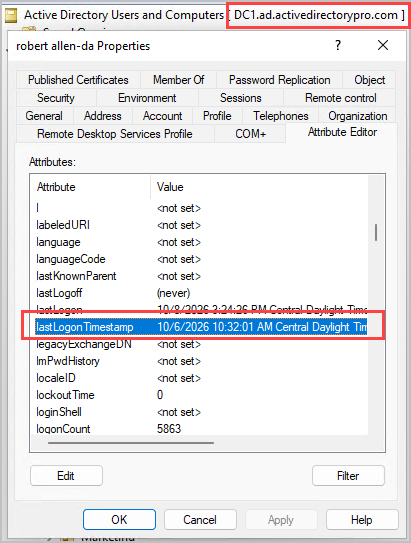
Now on DC2.
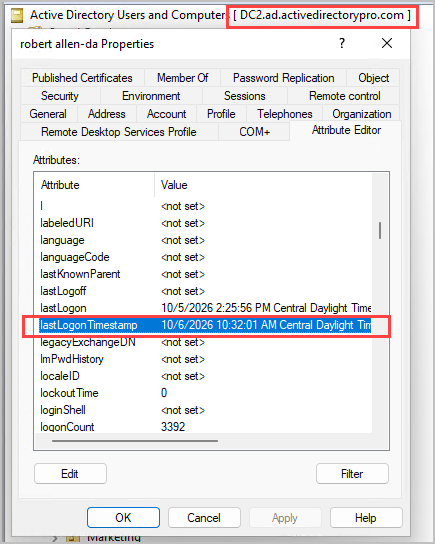
You can see both domain controllers have the exact same value for this attribute and that's because that specific attribute is replicated to all domain controllers.
Why it matters
It's important to understand non-replicated attributes vs replicated attributes because their values can differ between domain controllers. If you are creating a report or investigating an issue you need to have the correct information.
Querying only one domain controller may return incomplete or outdated information. For example, to determine a user's most recent lastLogon date, you must check the lastLogon attribute on all domain controllers. Knowing which attributes are not replicated helps ensure accurate reporting, troubleshooting, and account management.
List of non-replicated attributes
Here is a list of non-replicated attributes for the default schema.
Important: back-link attributes still match on every DC
Back-link attributes, such as memberOf, directReports, managedObjects and any attribute ending in BL, are on this list because they are not replicated themselves. Each domain controller builds them from a matching forward-link attribute that does replicate. For example, a user's memberOf is built from the member attribute on each group, and directReports is built from the manager attribute on each user.
So unlike lastLogon, a back-link has the same value on every domain controller once replication has completed.
- badPasswordTime
- badPwdCount
- bridgeheadServerListBL
- directReports
- distinguishedName
- dSCorePropagationData
- frsComputerReferenceBL
- fRSMemberReferenceBL
- isPrivilegeHolder
- lastLogoff
- lastLogon
- logonCount
- managedObjects
- masteredBy
- memberOf
- modifiedCount
- msAuthz-MemberRulesInCentralAccessPolicyBL
- msCOM-PartitionSetLink
- msCOM-UserLink
- msDFSR-ComputerReferenceBL
- msDFSR-MemberReferenceBL
- msDS-AssignedAuthNPolicyBL
- msDS-AssignedAuthNPolicySiloBL
- msDS-AuthenticatedToAccountlist
- msDS-AuthNPolicySiloMembersBL
- msDS-BridgeHeadServersUsed
- msDS-Cached-Membership
- msDS-Cached-Membership-Time-Stamp
- msDS-ClaimSharesPossibleValuesWithBL
- msDS-ComputerAuthNPolicyBL
- msDS-EnabledFeatureBL
- msDS-ExecuteScriptPassword
- msDS-GenerationId
- msDS-HostServiceAccountBL
- msDS-IsDomainFor
- msDS-IsFullReplicaFor
- msDS-IsPartialReplicaFor
- msDS-IsPrimaryComputerFor
- msDS-KeyCredentialLink-BL
- msDS-KeyPrincipalBL
- msDS-KrbTgtLinkBl
- msDs-masteredBy
- msds-memberOfTransitive
- msDS-MembersForAzRoleBL
- msDS-MembersOfResourcePropertyListBL
- msds-memberTransitive
- msDS-NC-RO-Replica-Locations-BL
- msDS-NcType
- msDS-NonMembersBL
- msDS-ObjectReferenceBL
- msDS-OIDToGroupLinkBl
- msDS-OperationsForAzRoleBL
- msDS-OperationsForAzTaskBL
- msDS-parentdistname
- msDS-PSOApplied
- msDS-ReplicationEpoch
- msDS-RetiredReplNCSignatures
- msDS-RevealedDSAs
- msDS-ServiceAuthNPolicyBL
- msDS-TasksForAzRoleBL
- msDS-TasksForAzTaskBL
- msDS-TDOEgressBL
- msDS-TDOIngressBL
- msds-tokenGroupNames
- msds-tokenGroupNamesGlobalAndUniversal
- msds-tokenGroupNamesNoGCAcceptable
- msDS-TransformationRulesCompiled
- msDS-UserAuthNPolicyBL
- msDS-USNLastSyncSuccess
- msDS-ValueTypeReferenceBL
- msSFU30PosixMemberOf
- msTPM-TpmInformationForComputerBL
- msTSPrimaryDesktopBL
- msTSSecondaryDesktopBL
- netbootSCPBL
- nonSecurityMemberBL
- objectGUID
- ownerBL
- partialAttributeDeletionList
- partialAttributeSet
- pekList
- prefixMap
- queryPolicyBL
- replPropertyMetaData
- replUpToDateVector
- repsFrom
- repsTo
- rIDNextRID
- rIDPreviousAllocationPool
- schemaUpdate
- serverReferenceBL
- serverState
- siteObjectBL
- subRefs
- uSNChanged
- uSNCreated
- uSNLastObjRem
- whenChanged
List every non-replicated attribute with PowerShell
If you have updated your Active Directory schema you may have other non-replicated attributes. To see all non-replicated attributes in your domain run the command below.
$schema = (Get-ADRootDSE).schemaNamingContext
Get-ADObject -SearchBase $schema -LDAPFilter "(systemFlags:1.2.840.113556.1.4.803:=1)" -Properties lDAPDisplayName |
Select-Object lDAPDisplayName | Sort-Object lDAPDisplayName
Check a non-replicated attribute on every DC
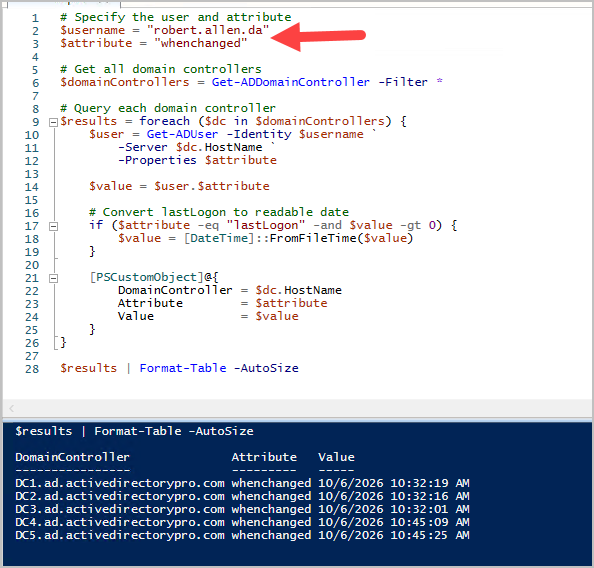
Here is a script that will let you check a non-replicated attribute on every domain controller. At the top change username and the attribute value.
# Specify the user and attribute
$username = "jsmith"
$attribute = "lastLogon"

# Get all domain controllers
$domainControllers = Get-ADDomainController -Filter *

# Query each domain controller
$results = foreach ($dc in $domainControllers) {
    $user = Get-ADUser -Identity $username `
        -Server $dc.HostName `
        -Properties $attribute

    $value = $user.$attribute

    # Convert lastLogon to readable date
    if ($attribute -eq "lastLogon" -and $value -gt 0) {
        $value = [DateTime]::FromFileTime($value)
    }

    [PSCustomObject]@{
        DomainController = $dc.HostName
        Attribute        = $attribute
        Value            = $value
    }
}

$results | Format-Table -AutoSize
Here is an example of checking the whenchanged attribute on all 5 of my domain controllers.