
AD Password Notification
Active Directory Password Expiration Notification
Email your users before their password expires. The tool checks Active Directory on a schedule, finds the accounts about to expire, and sends the reminder for you.
Free, with no send limits and no trial clock.
What the tool does
Everything below is free with no daily limits, apart from the last two, which need a license.
Email notifications
Automatically email users before their password expires, with the days remaining and the expiration date.
Password expiration dates
Pull every user's password expiration date straight from Active Directory, with no scripting.
Customize the message
Write your own subject and body, and drop in dynamic fields like name, expiration date and days left.
Runs on a schedule
Set the notification window and let it run in the background as a scheduled task. Set it once and forget it.
Expiration dashboard
See which passwords expire in 7, 14 or 30 days, which have already expired, and which never expire.
Notification logs
Every sent notification is logged and searchable, so you can prove a user was told before they call.
Second email notification
Licensed. Send a follow-up reminder at a second interval, for example 14 days out and again at three.
HTML emails with your logo
Licensed. Branded, formatted messages instead of plain text.
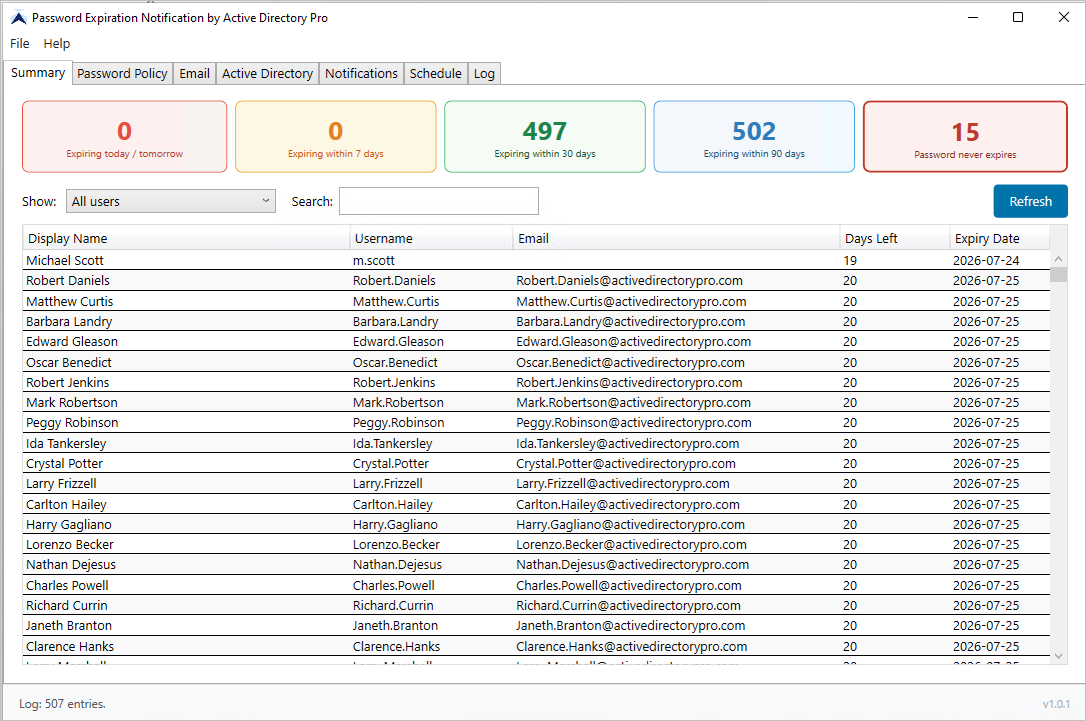
Dashboard
See every expiring password at a glance
The dashboard shows where your domain stands right now, so you can catch the accounts about to cause a helpdesk call.
- Passwords expiring in 7, 14 or 30 days
- Already expired accounts
- Accounts set to never expire
- Filter and search the whole list
Email template
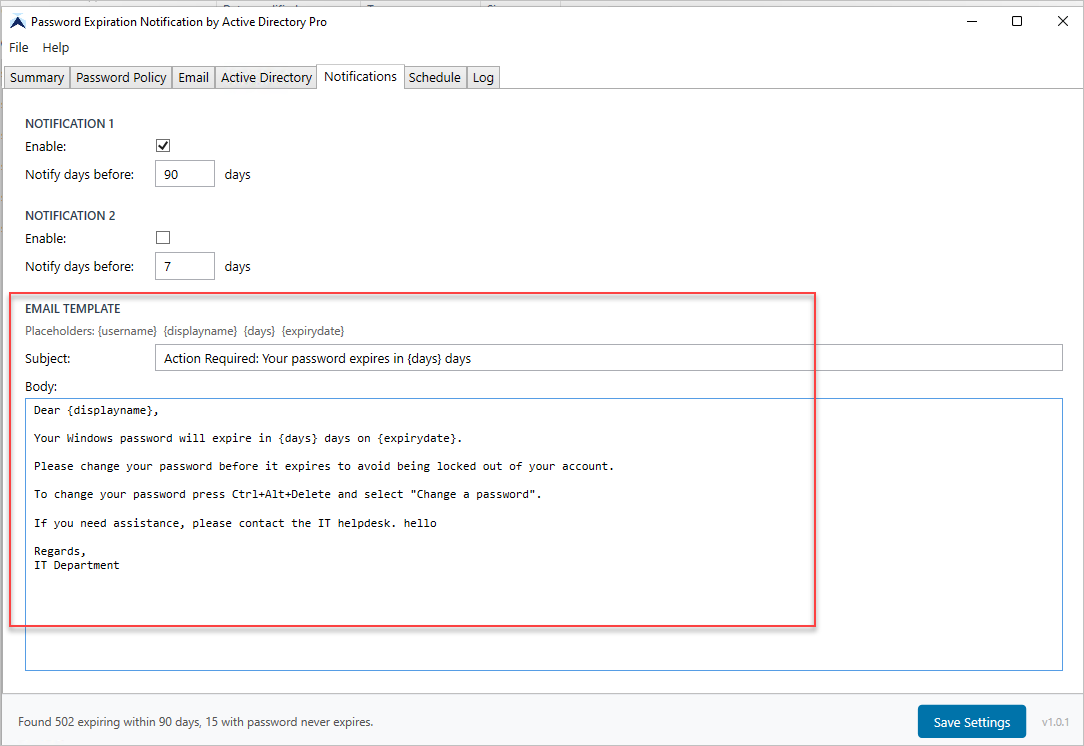
Write the email your users will actually read
Set your own subject line, body and reset instructions. Dynamic fields fill in each user's details, so every message is personal.
- Custom subject, body and reset instructions
- Merge fields for name, expiration date and days remaining
- Send a test message before you go live
What users receive
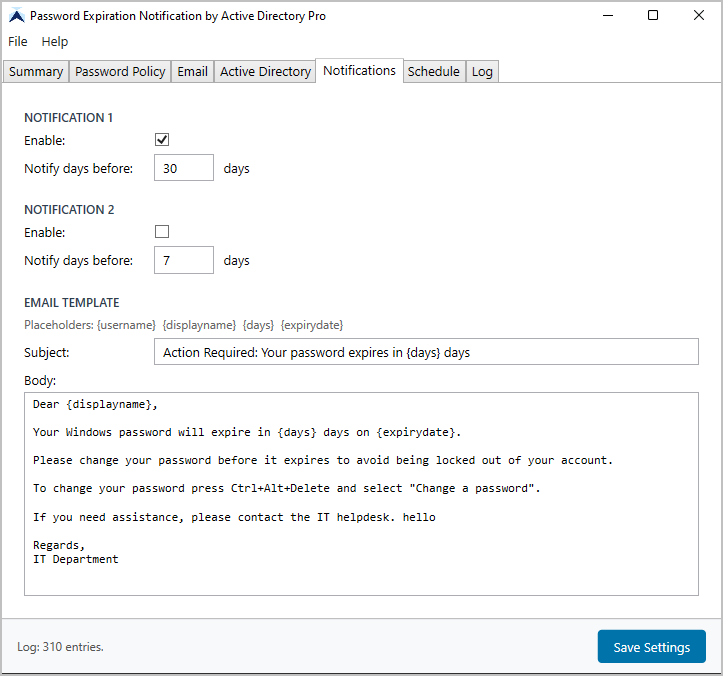
A clear reminder, before it becomes a ticket
Users get a plain, readable email telling them when their password expires and what to do about it, while they can still fix it themselves.
- Days remaining and the exact expiration date
- Your own reset instructions and links
- HTML emails with your company logo, with a license
Logs
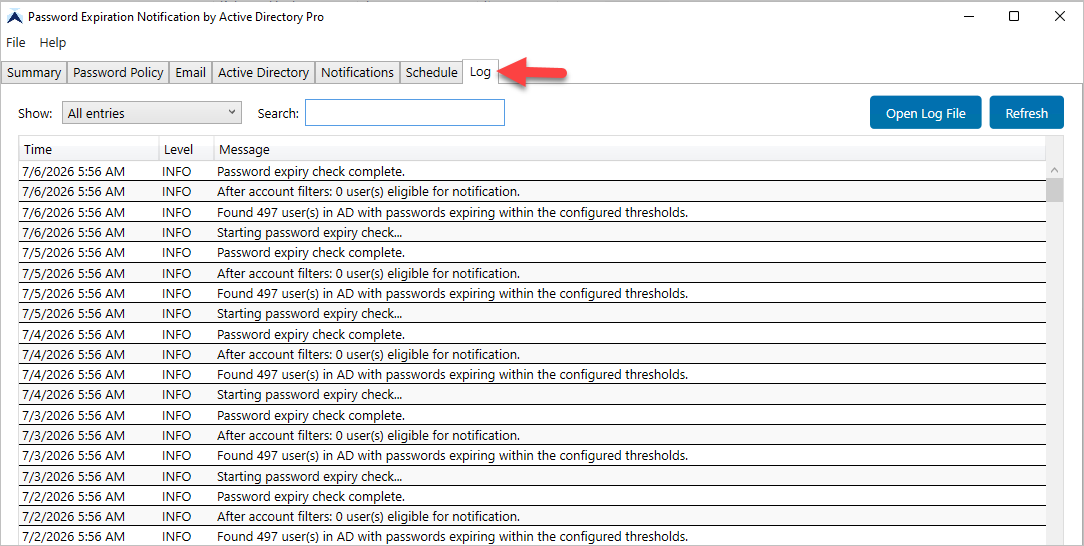
Know exactly who was notified, and when
Every notification is written to the log with the user, the address and a timestamp. When someone says they were never told, you can check in seconds.
- Full history of every sent notification
- Search by user or email address
- Confirm delivery when a user disputes it
Free, with two optional extras
The tool is free to use with no send limits. Two features are reserved for the licensed version.
Free
$0
Everything you need to start notifying users today.
- Unlimited email notifications, no daily limit
- Password expiration dashboard
- Customize the email subject and message
- Runs automatically on a schedule
- Notification logs and search
- Domain password policy and never-expires report
Licensed
$99 / year
Everything in the free version, plus the two features below.
- Second email notification, so you can remind users at two intervals
- HTML emails with your company logo, instead of plain text
- Product updates and support for 12 months
There is no trial clock and no send cap on the free version. Upgrade only if you want a second reminder or branded HTML email.
Frequently asked questions
Is it really free?
Yes. The tool sends unlimited notifications at no cost, with no daily limit and no trial period. Only the second email notification and HTML emails with your logo need a license.
What do I get if I pay?
Two things: a second email notification so you can remind users at two different intervals, and HTML emails with your company logo instead of plain text. A license also includes updates and support for 12 months.
Do I need to install it on a domain controller?
No. Install it on any workstation or server on the domain. It reads Active Directory using your existing credentials.
What mail server does it work with?
Any SMTP server, including Microsoft 365 and on-premises Exchange. You supply the SMTP host, port and credentials during setup.
Can I control when users are notified?
Yes. Set the notification window, for example 14 days before expiration. With a license you can add a second reminder closer to the date.
Will it tell me which accounts never expire?
Yes. The dashboard flags accounts with passwords set to never expire, along with your domain password policy.
Stop the password lockout tickets
Download the tool free and have your first notifications going out today.