
Active Directory security assessment
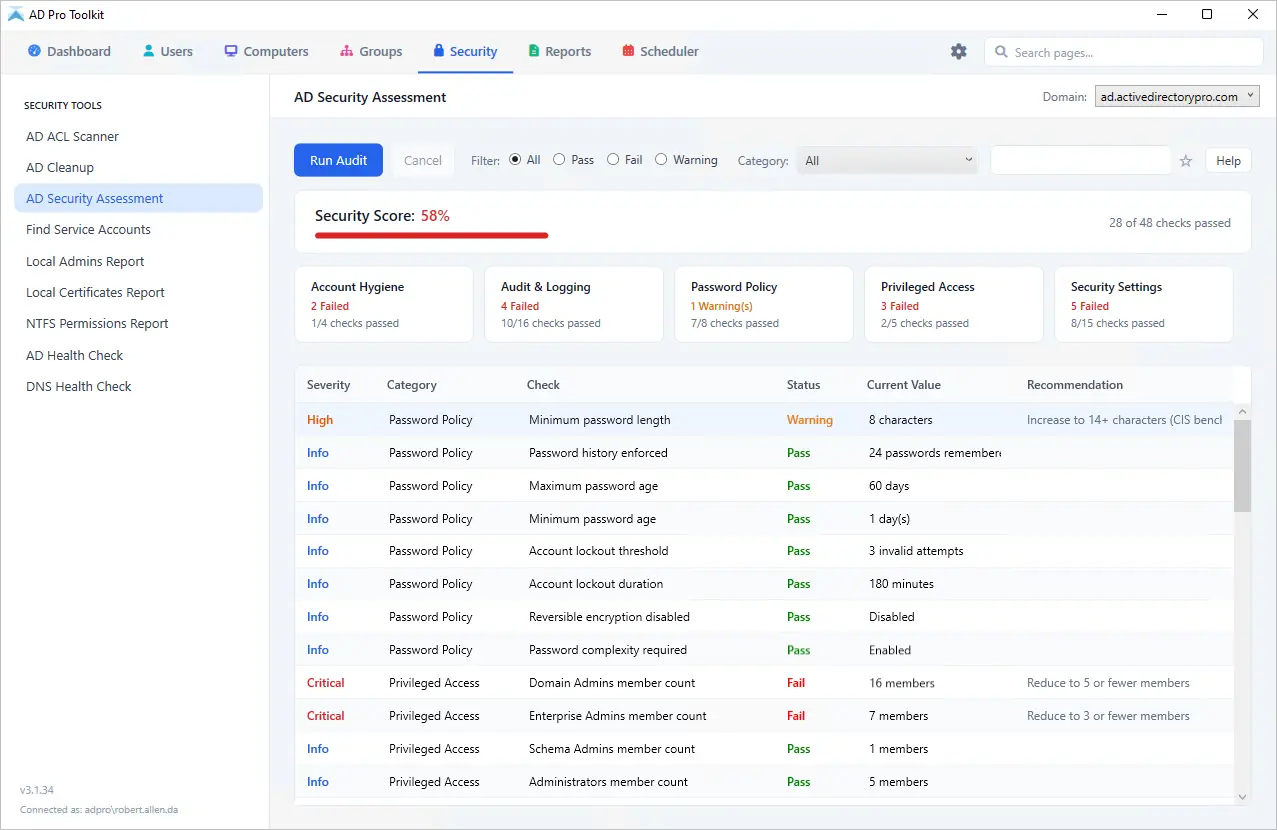
Scan your environment for 48 known vulnerabilities and misconfigurations across password policies, privileged access, account hygiene, and security settings, mapped to CIS Benchmarks and MITRE ATT&CK.
Included in AD Pro Toolkit, with 40+ tools in one console.
What does the security assessment tool check?
Misconfigurations, weak password policies, and stale accounts are among the most common entry points for attackers targeting Active Directory. The Security Assessment Tool scans your environment for well known vulnerabilities, giving you a clear report of what is at risk and how to address it.
48 checks for AD vulnerabilities and misconfigurations
| Check | Category | Description | Source |
|---|---|---|---|
| Minimum password length | Password Policy | Checks domain password policy minimum length. Pass: 14 characters or more | CIS Benchmark |
| Password history enforced | Password Policy | Checks how many passwords are remembered. Pass: 24 or more | CIS Benchmark |
| Maximum password age | Password Policy | Checks if passwords expire. Pass: 60-90 days | CIS Benchmark |
| Minimum password age | Password Policy | Checks minimum time before password can be changed. Pass: 1 day or more | CIS Benchmark |
| Account lockout threshold | Password Policy | Checks if account lockout is configured. Pass: 3-5 attempts | CIS Benchmark |
| Account lockout duration | Password Policy | Checks how long accounts stay locked. Pass: 15 minutes or more | CIS Benchmark |
| Reversible encryption disabled | Password Policy | Checks if reversible encryption is off. Pass: Disabled | CIS Benchmark |
| Password complexity required | Password Policy | Checks if complexity requirements are enabled. Pass: Enabled | CIS Benchmark |
| Privileged group member count | Privileged Access | Counts members in Domain Admins, Enterprise Admins, Schema Admins and similar. Flags excessive membership | Best Practice |
| Disabled accounts in privileged groups | Privileged Access | Checks for disabled accounts still in admin groups | Best Practice |
| Stale enabled accounts (90+ days) | Account Hygiene | Counts enabled accounts with no logon in 90+ days | Best Practice |
| Password set to never expire | Account Hygiene | Counts accounts with non-expiring passwords | CIS Benchmark |
| Password not required | Account Hygiene | Counts accounts with the PASSWD_NOTREQD flag | OWASP Microsoft |
| Kerberoastable accounts | Account Hygiene | Counts user accounts with SPNs set (Kerberoast attack risk) | MITRE ATT&CK |
| Users with SID History | Account Hygiene | Counts accounts with SID history (migration residue, potential attack vector) | MITRE ATT&CK |
| Stale computer accounts (90+ days) | Account Hygiene | Counts enabled computer accounts with no logon in 90+ days | CIS Benchmark |
| Guest account disabled | Security Settings | Checks if the built-in Guest account is disabled | CIS Benchmark |
| krbtgt password age | Security Settings | Checks when the krbtgt password was last reset. Warn if over 180 days | Microsoft NIST |
| Unconstrained delegation | Security Settings | Counts accounts trusted for unconstrained delegation (excluding DCs) | MITRE ATT&CK |
| Protected Users group membership | Security Settings | Checks if privileged accounts are in the Protected Users group | Microsoft |
| AdminCount orphan accounts | Security Settings | Accounts with adminCount=1 but not in any privileged group | Best Practice |
| AS-REP Roastable accounts | Security Settings | Accounts with Kerberos pre-authentication disabled (DONT_REQUIRE_PREAUTH) | MITRE ATT&CK |
| Accounts with DES encryption | Security Settings | Accounts with the USE_DES_KEY_ONLY flag enabled | CIS Benchmark |
| Machine account quota | Security Settings | Checks ms-DS-MachineAccountQuota. Pass: 0, so only admins can join computers | Microsoft |
| LAPS coverage | Security Settings | Percentage of enabled computers with LAPS passwords deployed | Microsoft |
| Constrained delegation | Security Settings | Counts user accounts with msDS-AllowedToDelegateTo configured | MITRE ATT&CK |
| AdminSDHolder consistency | Security Settings | Privileged accounts missing the adminCount flag, which indicates propagation issues | Microsoft |
| AD Recycle Bin enabled | Security Settings | Checks if the Active Directory Recycle Bin optional feature is enabled | Microsoft |
| Weak Kerberos encryption types | Kerberos Security | Accounts with msDS-SupportedEncryptionTypes set to DES only (no AES) | CIS Benchmark |
| Accounts with DES-only encryption | Kerberos Security | Accounts with the USE_DES_KEY_ONLY userAccountControl flag | CIS Benchmark |
| Audit policy configured on DCs | Audit & Logging | Checks if audit policies are enabled via GPO on the Domain Controllers OU | CIS Benchmark |
| Advanced Audit Policy | Audit & Logging | Checks specific subcategories: logon events, account management, directory service changes and others | CIS Benchmark |
Security checks grounded in real-world frameworks
Every check maps to one or more industry-recognized frameworks, so you are validating against the same standards auditors and penetration testers use.
How to run a security assessment
Two steps from opening the toolkit to a finished report.
-
01
Open the security assessment
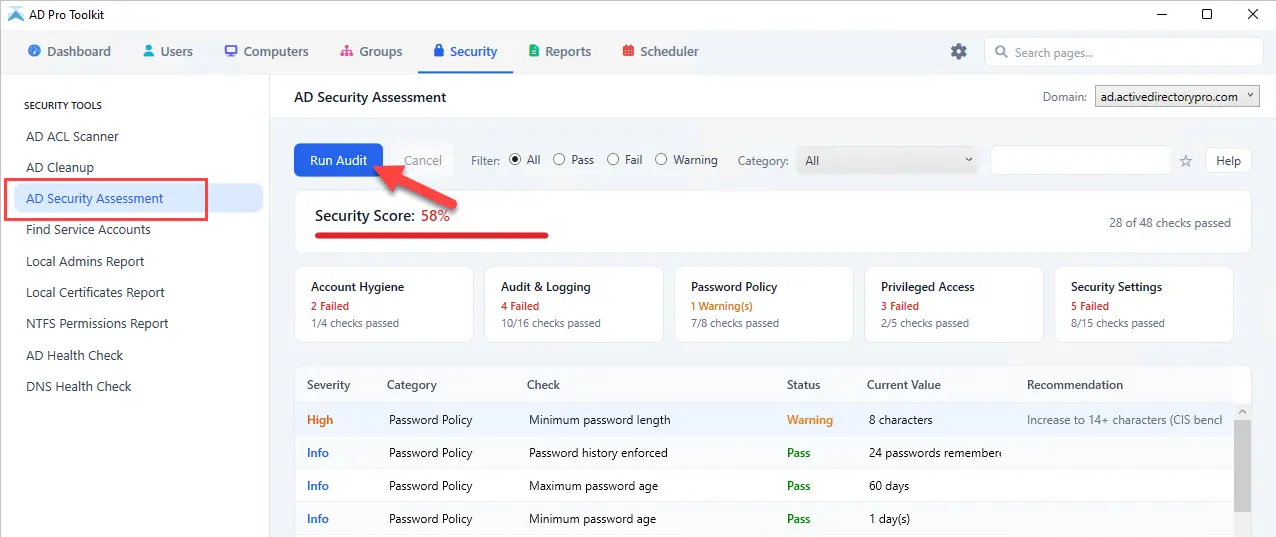
In AD Pro Toolkit, go to Security > Security Assessment.
-
02
Run the audit
Click Run Audit. The scan is read-only: it reports what it finds and recommends a fix, and changes nothing in the directory.
Find the gaps before someone else does
Try the security assessment free as part of AD Pro Toolkit. Fifteen days, every tool unlocked.